
Grocery List App
Welcome to the Grocery List App user guide. Explore the features and functionalities designed to make your grocery store trips structured, efficient, and hassle-free.
Smart Lists
Quick Item SetupTrip History
Recent Shopped ListsEasy Gestures
Swipe & Tap ActionsAndroid Version Notice
The BuyGrocery App on Android devices has been discontinued. We highly recommend switching to our modern, updated application: List My Shopping (LMS) (available on both iOS and Android). LMS offers enhanced stability and intuitive multi-purpose list management.
Contents
Shopping List Management
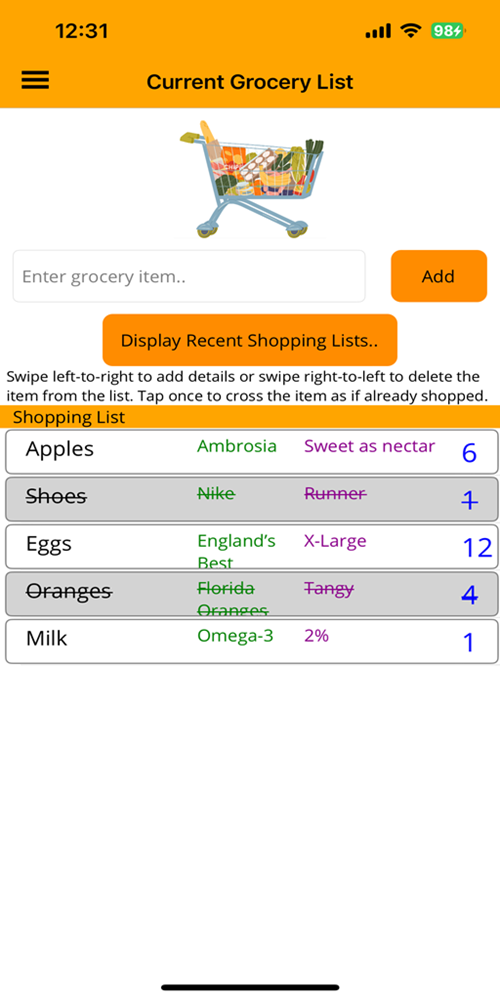
Organize your daily household shopping trips effortlessly. The Grocery List App lets you build real-time lists, append detailed brand specs, and archive recent store trips directly on your device.
| Gesture / Action | Functionality |
|---|---|
| Adding Items | Type in the "Enter grocery item..." text entry field to add items like Apples, Milk, or Bread to your list. |
| Item Details | Swipe Left-to-Right on any added item to specify product details such as Brand ("Fuji Apples"), Notes ("Sweet as nectar"), Quantity ("6"), and Store ("Walmart"). |
| Cross-Off Items | Tap an entry once to cross off a purchased item. Tap again to un-cross and bring it back into active status. |
| Deleting Items | Swipe Right-to-Left across an entry to permanently remove it from your active list. |
| Trip History | Past shopping lists are preserved locally by timestamp. Double-tap a past trip to view items, then double-tap an individual item to quickly re-add it to your active list! |